
Written in collaboration with Jonas Strambach, CEO and founder of LeadJourney, who contributed the web and CRM sections.
Three tools each see one slice of the same customer, and none of them can tell you which ad produced a paying user. Your web attribution tool sees the click and the form fill. Your CRM sees the sales call and the closed deal. Your MMP sees the app install and the in-app payment. Ask all three which campaign is working and you get three different answers.
Take a hypothetical wealth app spending Rs4 lakh a month on Meta. A prospect taps an ad on Monday and fills in a "book a call" form on the website. An adviser calls on Thursday. On Friday the prospect gets an onboarding email, installs the app and completes KYC. A week later they make a first investment. Meta reports a lead, the CRM reports a won deal with no campaign attached, and the MMP reports an organic install.
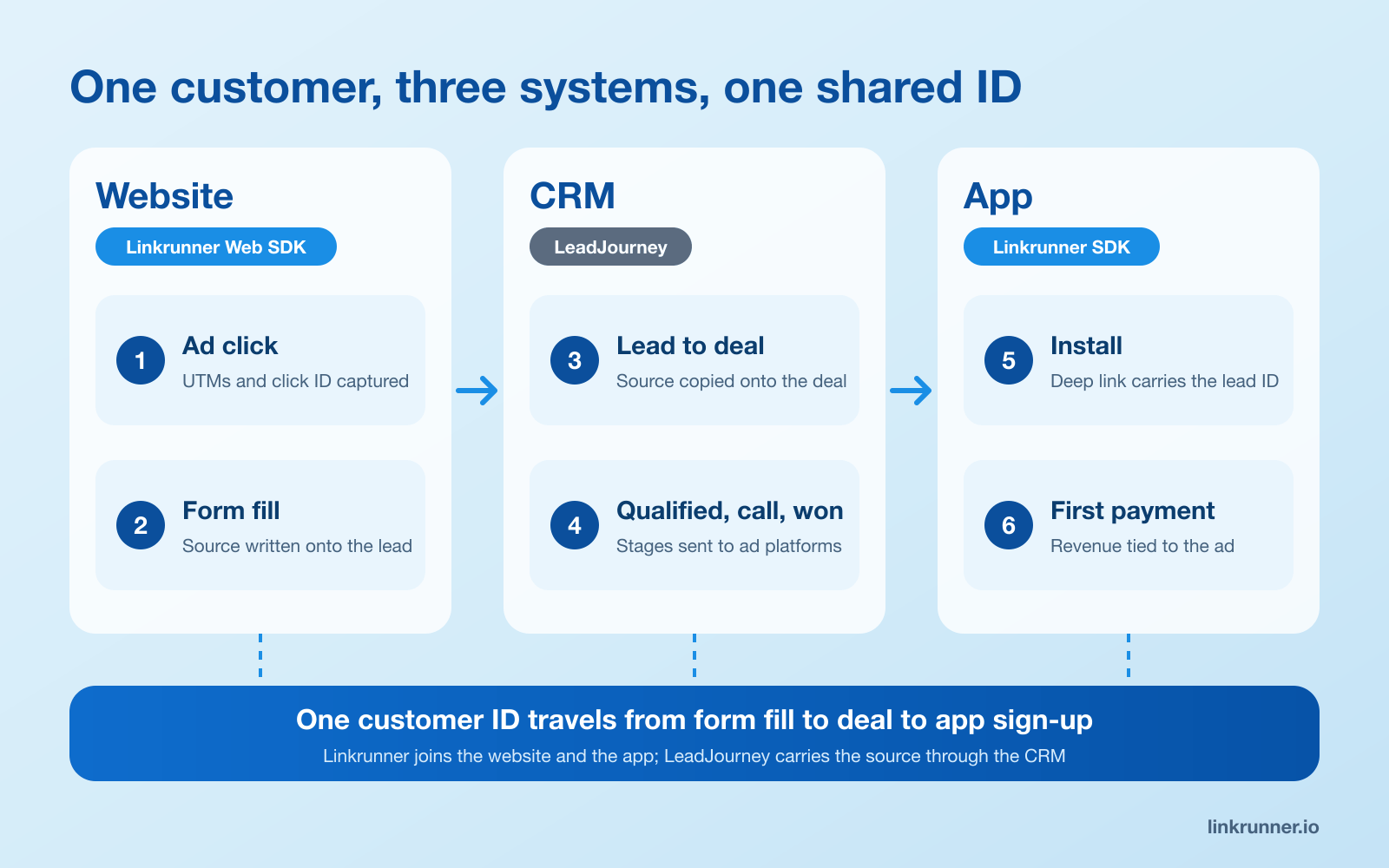
Linkrunner already measures the website and the app in one platform, so two of those records sit together from the start. The gap is the CRM in between, which is where LeadJourney comes in. This guide joins all three with one shared ID, stage by stage.
Why do web, CRM and app attribution give different answers?
Web, CRM and app attribution is the practice of tracing one customer from the ad click on your website, through the lead and sales stages in your CRM, to the install and revenue in your app, using one shared customer ID.
Each system is built to answer a different question:
- Web attribution ties website visits and form fills to the campaign that sent the visitor
- The CRM tracks the person through qualification, calls and deals, and CRM attribution ties those deals back to the campaign
- The MMP ties app installs and in-app events to a campaign
The thread breaks at the hand-offs:
- The form submission does not carry the UTM into the lead record
- The deal has no campaign field, so "won" is never connected to an ad
- The app install comes from an onboarding email, not an ad, so the MMP files it as organic
The cost is concrete: budget flows to channels that produce cheap leads that never install or pay. This is a different problem from moving a web visitor into an app; web attribution vs web-to-app attribution covers that one.
Stage one: capture the source on the website
The source has to be captured when the visitor lands and saved onto the lead when they submit the form. Everything later depends on this record being right.
- Capture UTMs and ad click IDs on landing (
gclid,gbraidandwbraidfor Google,fbclidfor Meta,li_fat_idfor LinkedIn,msclkidfor Microsoft Ads,ttclidfor TikTok) and keep them for the whole sales cycle, not just the session. A deal that closes 60 days later still needs its click ID to be sent back. - Write them onto the lead at submission. The CRM contact should arrive with source, medium, campaign and click ID already filled in.
- Keep first and last touch. High-consideration leads often visit two or three times before converting. First touch shows what started the journey; last touch shows what closed the form.
- Hidden form fields versus a tracking script. Hidden fields are simple but lose the source when the visitor leaves and comes back later. A first-party script on your own domain keeps the source across repeat visits, and sending the events server-side keeps them when an ad blocker or the browser drops the pixel, within the limits covered in what is web attribution.
Linkrunner's Web SDK captures the source on landing and keeps click IDs for 90 days, with website and app results in one platform. Tools built for web and CRM attribution like LeadJourney carry that source into the CRM and onto the deal.
What we see across LeadJourney accounts. When we connect a new account, the CRM's lead source field almost always overstates Direct and branded search, because it records the last visit before the form. The paid social ad, the AI search answer or the article that started the journey rarely appears in it. Storing first touch next to last touch is usually the change that moves budget first.
"The most common mistake is reading the lead source from the contact's last form fill. By the time the deal closes, that field says Direct or brand search, and the ad that started the journey has no revenue against it. Store first and last touch on the deal itself and send the won stage back to the ad platforms, or they keep optimising for form fills."
Jonas Strambach, CEO and founder, LeadJourney
Stage two: carry the source through the CRM
A source on the first form fill is not enough. It has to follow the person to the deal, and the deal's outcome has to go back to the ad platforms.
- Copy the source to the deal, not just the contact. Reports on revenue are built from deals, so a source that only lives on the contact is invisible there.
- Map deal stages to conversion events, such as qualified, call booked, call held and won. Each stage becomes something you can count by campaign.
- Send those stages back to the ad platforms as offline conversions. Meta, Google, LinkedIn and Microsoft Ads all accept conversions that happen after the click, matched on the click ID or a hashed email or phone number. This lets the algorithms optimise for qualified leads rather than form fills. Send a value with each stage where you have one, so a won deal counts for more than a qualified lead.
- Allow for the delay. A deal can close weeks after the click. Our guide to tracking leads who convert later covers windows and timing.
Website and app conversions already go back to Meta and Google through Linkrunner; the CRM adds the stages after the form.
Stage three: tie the app install to the same person
This is the hand-off most teams lose. After the call, the customer is sent to the app by email, SMS or WhatsApp, and the install arrives with no campaign attached.
- Put a deferred deep link in the onboarding message. Deferred deep linking carries context through the app store install and ties the install to that link. The same approach is covered for email and CRM campaigns.
- Add the lead ID to the link, so the install matches the person who was called.
- Pass the same customer ID at app sign-up. From that moment, every in-app event belongs to the existing lead record.
- Track the events that mean revenue: KYC complete, first deposit, first payment or subscription start.
Linkrunner handles this leg: attribution and deferred deep linking come from one SDK, and as a mobile and web attribution platform it shows website and app results side by side.
The join key: one customer ID across three systems
Every stage above depends on one identifier travelling through all three systems, a process known as identity stitching. Pick the identifier before you build anything.
- The options: your CRM contact ID, your own internal user ID, or a hashed email or phone number
- The flow: the website's visitor becomes a lead with an ID; the CRM stores that ID on the contact and the deal; the app sends the same ID at sign-up
- The rule: whichever ID you choose, it must be identical in every system, including formatting
Tech Explainer: why a hashed email works, and when it fails. Hashing turns an email into a fixed code, so two systems can match on it without exchanging the address. It fails when the person signs up in the app with a different email from the one on the form. That is why an ID you generate and pass through the onboarding link is more reliable than an email alone.
Consent matters at every step. Collect it on the form, record it in the CRM, and only pass identifiers to systems the person agreed to. For India, see what DPDP consent managers change for app marketers.
What can you measure once it is joined?
Joining the three records turns cost per lead into cost per paying customer.
| Metric | Systems needed | Question it answers |
|---|---|---|
| Cost per paying customer by campaign | Ad platform, CRM, app | Which campaigns produce revenue, not just leads? |
| Lead-to-install rate by channel | Web, app | Which sources bring leads that never download the app? |
| Time from lead to first payment | CRM, app | How long should attribution windows be? |
| Lead quality by creative | Web, CRM | Which ads bring leads that pass qualification? |
The second metric is often the most revealing. A channel with the lowest cost per lead can have the weakest lead-to-install rate, which stays invisible until the records are joined.
What still won't match, and a setup checklist
Even a joined setup has limits:
- Cross-device attribution gaps: a person who fills the form on a laptop and installs on a phone joins up only when the shared ID reaches the app
- Changed emails: a different email at sign-up breaks email-based matching
- Consent refusals: people who decline tracking cannot be joined, and should not be
- Platform totals: Meta and Google count conversions by their own rules, so their numbers will not equal your CRM's
Setup checklist:
- Choose the join key and document its exact format.
- Capture UTMs and click IDs on landing, and write them onto the lead.
- Copy the source from contact to deal, and map deal stages to events.
- Send qualified and won stages back to the ad platforms, with a value where you have one.
- Put a deferred deep link with the lead ID in every onboarding message.
- Pass the same ID at app sign-up, and track revenue events.
- Test one journey end to end: click, form, call, install, payment.
FAQ
Do I need both a web attribution tool and an MMP? Not if one platform covers both. Linkrunner measures website visits, sign-ups and purchases alongside app installs and in-app events. A separate tool is only needed for CRM stages such as qualified leads, calls and closed deals.
What is the best join key between a CRM and an app? An ID you generate, such as the CRM contact ID, passed through the onboarding link and sent at app sign-up. A hashed email works as a backup but fails when people use a different address.
What happens if a lead installs the app before talking to sales? Pass the customer ID at sign-up as usual. The install joins the lead record when the IDs match, whichever came first.
Can I send app events back into my CRM? Yes. Linkrunner's webhooks can send app events to your own systems, and from there to the CRM, so sales sees when a lead installs or pays.
Which businesses need web, CRM and app attribution? Any business where a lead form and a sales step come before revenue in an app, such as fintech, insurance, edtech and real estate.
Joining the journey
The fix is not a new dashboard. It is one ID that survives three hand-offs: form to CRM, CRM to onboarding message, message to app. Get those right and cost per paying customer becomes a number you can act on.
Test a single journey before rolling it out. If you want web and app attribution in one place, book a demo with Linkrunner.